
Higher education now spans campus classes, online courses, hybrid programs, and short credentials. Students expect clear access to lessons, grades, feedback, and support from any device. Faculty also need tools that cut routine work and help track progress.
A learning management system brings these tasks into one place. Yet universities have different needs, budgets, and tech stacks. The best LMS for higher education depends on course size, teaching style, integrations, data needs, and support. This guide compares 10 options and shows how to choose the best LMS before a campus-wide contract.
What is an LMS for Higher Education?
An LMS for higher education is software that helps colleges create, deliver, manage, and assess learning. It supports campus, hybrid, and online courses in one place. Most platforms include course content, assessments, grades, discussions, and progress reports. They also offer mobile access so students can learn and check course updates from different devices.
An LMS can also connect with other systems a university uses. For example, 1EdTech’s LTI standard lets an LMS connect with outside learning tools through secure sign-on and data exchange, including grade return. This helps create a more connected learning system.
What are the 10 Best LMS for Higher Education?
Each LMS mentioned below offers unique features. Learning Management System Features. In a study, 75% of respondents said their LMS increases accessibility. This shows how an LMS can support flexible learning beyond the classroom.
This is not a ranked list, as each one can fit a different university model. Choice depends on course needs, staff skills, budget, and current systems.
| LMS | Best for | Top Feature | Rating* |
| Canvas | Cloud-first universities | Analytics and integrations | 4.6/5 |
| Moodle | Institutions needing control | Open-source customization | 4.3/5 |
| Blackboard Learn | Complex university needs | Assessment tools | 4.1/5 |
| D2L Brightspace | Online and blended learning | Analytics and competencies | 4.2/5 |
| Sakai | Open-source higher ed teams | Collaboration | 4.1/5 |
| Open LMS | Managed Moodle delivery | Curated Moodle environment | 4.7/5 |
| Open edX | Degrees and large online programs | Scalable delivery | 4.8/5 |
| Chamilo | Cost-conscious teams | Easy course management | 4.7/5 |
| ILIAS | Custom learning and exams | Assessment workflows | 4.4/5 |
| Schoology Learning | Existing PowerSchool users | Course organization | 4.4/5 |
*Ratings are third-party review snapshots checked in September 2026 from Capterra. They can change as more ratings get added.
1. Canvas
Canvas is one of the best LMS for higher education based on usage. It supports online, hybrid, and in-person courses. It gives faculty tools for course design, grading, quizzes, discussions, and student feedback. Its analytics help staff track course activity and student progress.
Canvas also offers mobile apps, SIS links, and LTI integrations. It can connect with more than 1,000 external tools. This can help universities link video, testing, library, and other learning tools. Its cloud model can also reduce the need for local server work.
2. Moodle
Moodle is an open-source LMS that gives universities more control over data, design, and features. Faculty can build courses with lessons, quizzes, forums, assignments, and grading tools.
Its large plugin base also lets institutions add new functions as needs change. Moodle has more than 2,000 open-source plugins and certified partners for hosting and support. Universities can self-host Moodle or use a managed service. This flexibility can help schools with unique course needs or strong IT teams.
Also Read: How is AI in Learning Management Systems Changing Employee Training?
3. Blackboard Learn
Blackboard Learn from Anthology supports course delivery, grading, assessment, and student progress tracking. Faculty can create content, run tests, give feedback, and manage grades in one system.
Blackboard offers cloud-based deployment through its SaaS model. This can reduce the need for institutions to manage core system updates themselves. It is the best LMS for higher education for large universities with complex courses and user workflows.
4. D2L Brightspace
D2L Brightspace supports blended, fully online, and competency-based learning. Its tools cover course content, assignments, quizzes, grading, and student feedback. Built-in analytics can help staff spot learning gaps and track student activity.
The platform also supports mobile learning and personalized learning tools. These features can help universities support students across different course formats. Its focus on data can also help faculty use course activity to guide student support.
5. Sakai
Sakai is a fully open-source LMS built for education. It supports course creation, assignments, tests, discussions, grade books, and collaboration.
Universities can self-host the platform and change parts of the system to meet local needs. This gives IT teams greater control over data and system design. Sakai can also lower license costs compared with some commercial platforms. However, universities need staff or partners who can handle hosting, updates, and support.
6. Open LMS
Open LMS is a Moodle-based LMS hosted on Amazon Web Services (AWS). Its EDU product is designed for colleges and universities that want managed Moodle delivery. It provides tools for courses, assessments, grading, reporting, and student engagement.
Universities can use Moodle-based features without managing the full technical setup themselves. This can reduce some IT work while keeping the familiar Moodle environment. It is the best LMS for higher education when institutions want both flexibility and managed hosting.
7. Open edX
Open edX is an open-source platform for degrees, credentials, lifelong learning, and large online programs. It supports course content, assessments, discussion, mobile learning, APIs, and LTI connections. Universities can self-host it or work with an external hosting partner.
Open edX says its platform supports more than 140 million learners and 70,000 courses. Its scale makes it useful for institutions serving large online audiences. It can also support universities building public courses or digital credential programs.
8. Chamilo
Chamilo is a free and open-source LMS focused on simple course management. It supports lessons, tests, assignments, certificates, skills, and learner tracking. It also supports SCORM and xAPI for learning content and data.
Its simple design can help faculty manage courses without a steep learning curve. Universities can use its open-source model to control deployment and costs. It may work well for institutions that need core LMS functions without a large commercial system.
9. ILIAS
ILIAS is open-source software for learning, assessment, collaboration, and knowledge work. It supports courses, exams, surveys, learning paths, and other teaching tools.
Its assessment features can help universities manage tests and track results. Institutions can also adapt the system to fit their own learning setup. This makes ILIAS useful for universities with specific workflows or strong technical support. Its open-source model also gives institutions more control over system data.
10. Schoology Learning
Schoology Learning is part of PowerSchool and is widely known in school education. But it also has users in higher education. The platform supports course content, assignments, assessments, discussions, grading, and learning resources.
Its links with the wider PowerSchool ecosystem may benefit institutions already using its products. Universities should confirm higher education features and support before choosing it. This makes it more relevant for institutions seeking continuity across existing education systems.
How Do You Choose the Best LMS for Your University?
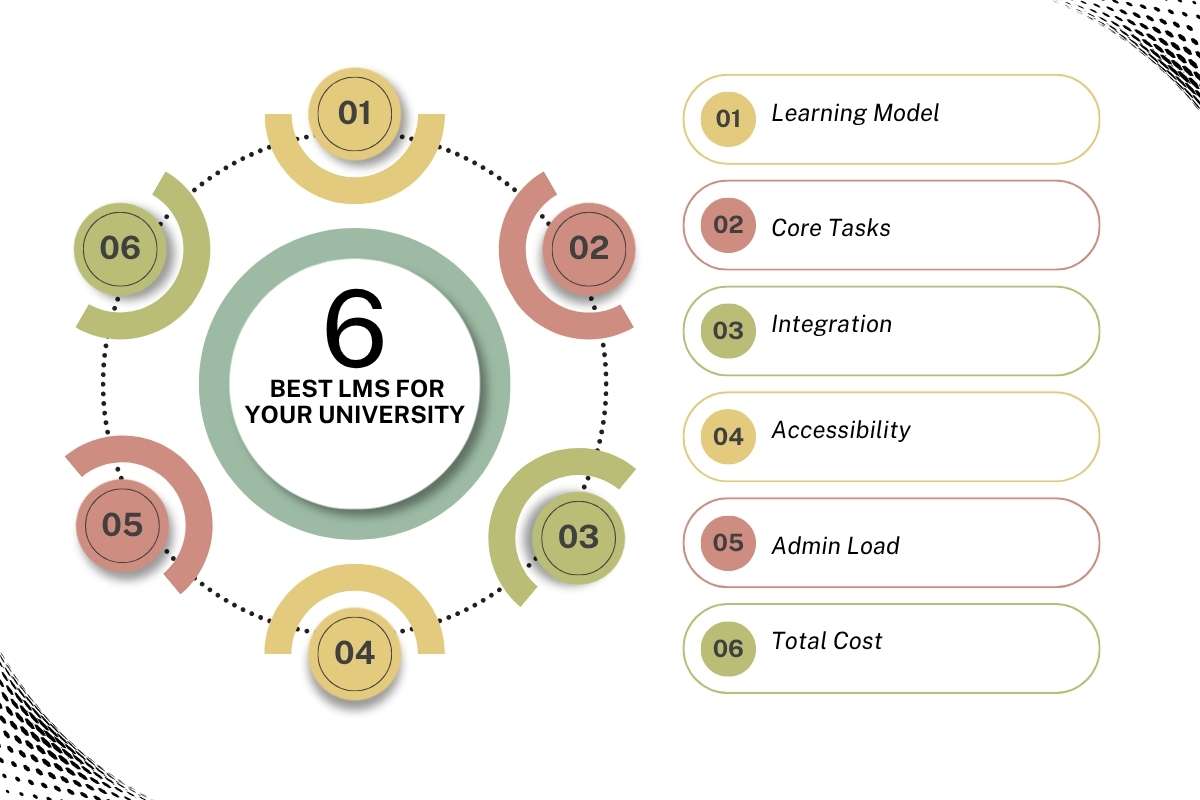
Choosing the best LMS for higher education starts with teaching and student needs. As Clayton R. Wright, international education consultant, notes, “Introducing or replacing an institutional learning management system (LMS) should involve all stakeholders.”
To choose one for your university, build a scorecard around six areas:
- Learning Model: Online, hybrid, campus, competency-based, or continuing education
- Core Tasks: Course design, grading, feedback, attendance, discussions, exams, and reporting
- Integration: SIS, identity, library, video, testing, payment, and data warehouse
- Accessibility: Keyboard use, captions, screen readers, and clear content tools
- Admin Load: Templates, permissions, upgrades, backups, and support
- Total Cost: Software, migration, setup, training, integrations, and add-ons
Run the same test course in every finalist. Ask faculty to build one module, create an assessment, grade work, and review analytics. Ask students to find an assignment, submit it, check feedback, and use the mobile app. This gives your team evidence before a major purchase.
What Should You Know Before Choosing the Best LMS for Higher Education?
For procurement teams, the best one should connect cleanly with the campus learning stack. Check identity, SIS data, course shells, roles, data exports, and third-party tools. LTI can reduce custom work by offering a standard way to connect outside learning tools.
Check contract terms too. Ask who owns course data, how exports work, what happens at renewal, and how support works after launch. Review uptime, security, privacy, and accessibility terms.
Faculty adoption matters. A feature-rich system can fail if instructors need too much training. Set a simple course navigation standard across departments.
How Much Does a Higher Education LMS Cost?
The cost of learning management systems varies by university. Large vendors often use quote-based pricing. As a general guide, the best LMS for higher education can cost about $5–$30 per student per year. It depends on the platform, features, and contract terms.
Universities may pay more in total because of implementation, support, and add-on tools. Open-source products may have no license fee, but they still need hosting, setup, and support.
Budget for five areas:
| Cost area | What to include |
| Software | License, users, modules, premium tools |
| Setup | Migration, configuration, integrations |
| People | IT, instructional design, training, help desk |
| Operations | Hosting, updates, security, support |
| Change costs | Testing, rollout, course redesign |
Moodle, Sakai, and Open edX can be self-hosted as open-source software, while Open LMS provides a managed Moodle-based service. A lower license cost does not mean zero total cost.
What Challenges Can Universities Face During LMS Implementation?

Projects often struggle when technology is chosen before processes are mapped. Common risks in LMS implementation challenges include poor data cleanup, weak templates, unclear roles, too many custom integrations, and limited faculty training.
Migration can expose old course problems. Links may break, grading rules may need review, and old content may not fit the new structure.
A safer rollout is:
- Map courses, users, systems, and data.
- Clean and test content before migration.
- Pilot with a small faculty and student group.
- Fix usability and integration issues.
- Train users by role, then expand.
- Track support tickets, errors, and adoption.
What is the Future of LMS in Higher Education?
The LMS is moving from a course container to a wider learning hub. AI will have a larger role in course creation, feedback, assessment, and analytics. A survey reported that 73% of surveyed higher education professionals used AI tools daily or weekly.
Future platforms future of learning management systems are likely to focus on:
- Learning analytics linked to early student support
- Better mobile and accessibility support
- Stronger AI controls, policies, and audit tools
- Skills, competencies, and stackable credentials
- Open standards and easier campus integration
- Flexible paths for online, hybrid, and lifelong learners
That makes it important to choose the best LMS for higher education with care. The aim is not to add every new feature. It is to make learning simpler, more connected, and easier to support.
Conclusion
In the end, the best LMS for higher education should fit your courses, people, data, and long-term plan. Canvas, Moodle, Blackboard, Brightspace, Sakai, Open LMS, Open edX, Chamilo, ILIAS, and Schoology offer different paths for universities.
Compare workflows, total cost, support, and ease of use before making a choice. Talk to faculty and students during the review. A pilot can reveal real problems and user needs that a long product demo may miss.
FAQs
1. Which LMS is most used in higher education?
Canvas and Moodle are widely known for their usage in higher education.
2. Is Moodle free for universities?
Moodle software is open source and can be used without a license fee. However, hosting, support, setup, and maintenance can still cost money.
3. What is the difference between an LMS and an SIS?
An LMS manages teaching and learning, while an SIS stores core student and academic records.
4. Can an LMS integrate with a university SIS?
Yes, modern LMS platforms can connect with SIS systems through connectors, APIs, and related standards.
5. How long does it take to implement the best LMS for higher education?
A university rollout can take several months or longer, based on migration size and other factors.