
A learning management system (LMS) is software that helps teams manage learning end-to-end. But how does a learning management system work in real use? It connects users, courses, learning tasks, assessments, and reports in one system. When a learner takes an action, the LMS records it and can use that data for tracking or automation.
This guide explains the full LMS workflow, from setting up users and delivering courses to tracking progress, automating tasks, and connecting other systems. It also shows how the same workflow supports schools and businesses.
How Does a Learning Management System Work from Start to Finish?
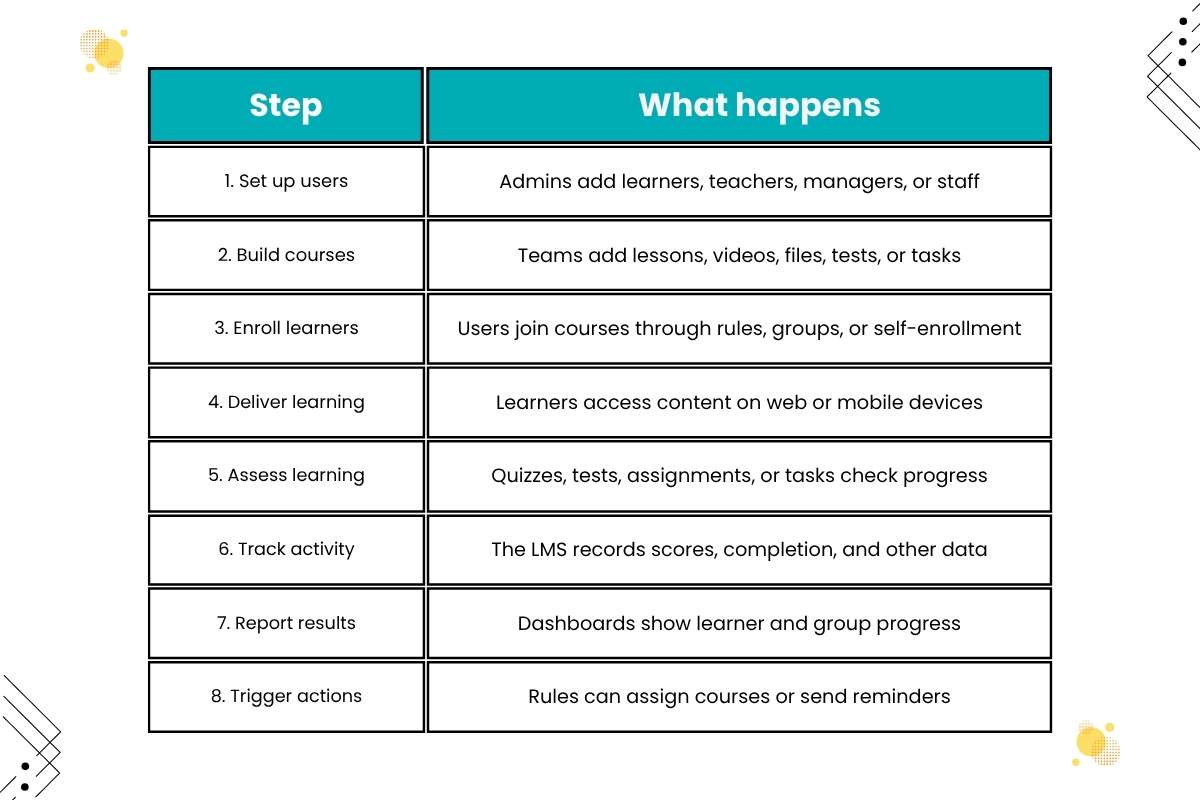
An LMS manages learning through a set of linked steps. Each step creates data that supports the next one.
| Step | What happens |
| 1. Set up users | Admins add learners, teachers, managers, or staff |
| 2. Build courses | Teams add lessons, videos, files, tests, or tasks |
| 3. Enroll learners | Users join courses through rules, groups, or self-enrollment |
| 4. Deliver learning | Learners access content on web or mobile devices |
| 5. Assess learning | Quizzes, tests, assignments, or tasks check progress |
| 6. Track activity | The LMS records scores, completion, and other data |
| 7. Report results | Dashboards show learner and group progress |
| 8. Trigger actions | Rules can assign courses or send reminders |
What Does an LMS Workflow Look Like in Practice?
A simple employee training workflow can look like this:
New employee joins → HR system sends employee data → LMS creates learner profile → onboarding course is assigned → employee completes lessons → quiz is scored → certificate is issued → manager views progress → HR reviews the record.
For a school, the flow may look different:
Student joins class → teacher adds coursework → student completes lesson → quiz is submitted → teacher grades work → LMS records the result → student and teacher view progress.
Both examples show learning management system examples how a learning management system works in real settings. The LMS links people, content, learning activity, results, and follow-up actions.
What Happens Behind the Scenes?
An LMS does more than show a course on a screen. It also captures actions and turns them into data that the system can use.
Learner action → LMS records activity → status or score updates → progress changes → report updates → automation may trigger the next action.
For example, a learner submits a quiz. The LMS records the submission and checks the score. It then updates the learner’s progress. If the learner meets the required score, the system may mark the course complete or issue a certificate.
This data flow is what lets an LMS support both day-to-day learning and larger training programs.
How Does a Learning Management System Work in Education and Business?

An LMS can serve very different groups without changing its basic workflow. A school may use it for classes, while a company may use it for LMS for Employee Development.
| LMS action | Education | Corporate training |
| Enroll learner | Add a student to a course | Assign training to an employee |
| Deliver content | Lessons, readings, and videos | Onboarding, compliance, and skill courses |
| Assess learning | Quiz, assignment, or exam | Quiz, test, or skill check |
| Track progress | Grades and course completion | Completion, scores, and certifications |
| Give feedback | Teacher feedback on student work | Manager or trainer feedback |
| Report results | Student or class progress | Team or training reports |
| Trigger next step | Assign the next lesson | Assign required follow-up training |
For Educators
Teachers and instructors use an LMS to manage coursework and student activity. They can:
- Create courses and lessons
- Upload files, videos, and other content
- Set assignments and quizzes
- Grade work
- Give feedback
- Track student progress
- Send course updates
A teacher might post a lesson on Monday, set a quiz for Wednesday, and review scores on Friday. The LMS keeps these tasks in one place.
Amy Kristin Sanders, associate professor in Residence, NU-Q Journalism Program, says, “I can spend less time on mundane tasks like grading multiple-choice questions and more time giving the students meaningful feedback on their writing.”
For L&D and Training Teams
Learning and development teams use an LMS to build and manage employee training. They can create onboarding courses, skill programs, safety training, and compliance courses.
They can also assign learning based on a worker’s role, team, or location. This helps large firms avoid sending the same training to every employee. For example, sales staff may receive product training, while new managers receive leadership courses. The LMS can place each group on a different learning path.
Brooke Carter, Program Manager of Machine Learning Education at Uber, described how her team used an LMS to automate course enrollment: “We have a learning management system that we’ve used to automate the course enrollment process, which has been a lifesaver compared to our previous, very manual process.”
For HR and Administrators
HR teams and system admins focus more on users, rules, records, and reports. They may manage employee profiles, course access, certificates, and training records.
Managers can also get reports that show which team members have finished required training. This gives HR a clearer view of training status without checking each learner by hand.
So, how does a learning management system work for these groups? The core process stays the same, but the content, users, and rules differ.
How Does an LMS Track Learning and Automate Routine Work?

Tracking is one of the key parts of an LMS. The system can record what learners do as they move through a course.
Common data points include:
- Course enrollment
- Lesson completion
- Quiz and test scores
- Assignment results
- Course activity
- Certificate status
- Learning path progress
- Skills or competency records
This data can then appear in dashboards and reports. An instructor may use it to find students who need help. An L&D manager may use it to check training completion across teams.
However, completion does not always mean learning took place. A report may show that an employee finished a course, but it may not prove that the person can use the skill at work. Only 30–35% of Indian organizations can directly link learning outcomes to business goals.
For this reason, teams can pair completion data with test scores, skill checks, surveys, or job-based measures. This gives a fuller view of training results.
How Does an LMS Automate Training?
An LMS can act on the data it collects. Admins can set rules that trigger tasks when certain events happen.
For example, an LMS can:
- Assign training when a new employee joins
- Send reminders before a deadline
- Require one course before another
- Renew training after a set period
- Notify a manager about overdue work
- Issue a certificate after completion
- Recommend the next course
Imagine a safety course that expires every year. Instead of finding every employee with an expired certificate, an admin can set a renewal rule. The LMS can then assign the course and send reminders when needed. This is an important part of how a learning management system works in large companies.
Automation can reduce the need for manual training administration. A survey of more than 1,100 workers and L&D professionals found that only 10% of organizations had automated tasks such as deciding who gets what training and when.
How Does a Learning Management System Work Together With Other Tools?
Learning management systems rarely work on their own. Schools and businesses often connect it with systems they already use.
Jen Spohn, Senior Systems Analyst at The Ohio State University, highlights the need for an LMS that can support complex systems and learner groups: “We needed something we could build into the future with. With our unique needs, one of the things we were looking for was an LMS that supported various integrations.”
| System | Why it connects to an LMS |
| HRIS | Sends employee and job data |
| Student information system | Shares student and class data |
| SSO | Lets users sign in with one account |
| Video tools | Supports live online classes |
| Content libraries | Adds learning materials |
| Business systems | Connects training with other work data |
To understand how a learning management system works with other systems, consider an employee onboarding process. An HR system adds a new worker. That information can flow into the LMS through an integration. The LMS can create or update the learner’s profile and assign the right onboarding courses. After the employee finishes the courses, the LMS stores the results.
HR or a manager can then view the training record without entering the same information twice. These connections can reduce duplicate data entry and keep user records more up to date. They also matter when teams compare LMS platforms.
How is AI Changing the Way an LMS Works?

AI is adding new tools to the basic LMS workflow. It can help teams create content, guide learners, and find patterns in learning data.
Here’s the role of AI in how a learning management system works:
- Drafting course content or quizzes
- Suggesting learning resources
- Giving course recommendations
- Supporting learners with AI assistants
- Helping create feedback
- Identifying possible skill gaps
The core workflow does not change. Users still need access, content still needs to be delivered, and learning activity still needs to be tracked. Instead, AI can help AI in learning management systems automate or personalize parts of these steps. For example, an LMS may use learner activity and skill data to suggest what someone should study next.
For L&D teams, this can help move an LMS from a system that mainly tracks training toward one that can also support more personalized learning.
Conclusion
An LMS brings the main parts of learning into one connected workflow. It helps teams set up users, deliver courses, assess learning, track activity, and report results.
For educators, this can mean simpler course and student management. For L&D teams, it can make employee training easier to assign and track. For HR and admins, it can reduce manual work and keep training records in one place. Understanding how does a learning management system work also makes it easier to compare platforms.
FAQs
1. How does an LMS work for students?
Students use an LMS to access courses, complete tasks, and track progress. You can also take tests and get feedback from teachers.
2. How does a learning management system work for employee training?
An LMS assigns employee training, delivers content, and tracks completion. Later, it records results and creates reports.
3. How does an LMS track learner progress?
It records activities such as course completion, assessment scores, and certification status.
4. Can an LMS automate training?
Yes. An LMS can automate enrollment, reminders, certificates, and other routine tasks.
5. Does an LMS need to connect with other software?
No, but integrations with HR, student, identity, and business systems can improve its workflow.