
Google Classroom helps teachers share lessons, set tasks, and track student work. A full learning management system (LMS) offers more tools to manage courses, tests, and student progress. The choice between Google Classroom and an LMS depends on your school’s needs.
Both tools help teachers and students work online. Yet, they serve different goals. Google Classroom suits daily classwork and schools that use Google Workspace. A full LMS fits schools that need deeper reports, set learning paths, and more control. This guide covers their key differences, real-world uses, and how to choose the right tool.
Is Google Classroom a Learning Management System?
Yes, Google Classroom is a basic learning management system. More than 40 million students and teachers use the platform to share assignments, communicate, and stay organized. It also connects with tools like Google Docs, Drive, and Calendar. However, it lacks some of the advanced learning management system features available in a full-fledged LMS.
Teachers can set up online classes, share files, and post tasks. They can set due dates, grade work, and give feedback. Students can view tasks, submit work, and check their grades. Teachers can also post news and use quizzes to test what students know.
A full LMS often offers more ways to build courses and track results. It may have detailed reports, custom tests, and set learning paths. Some tools can track skills across grades or link results to school goals.
Google Classroom vs LMS Scenario: A small school may use Google Classroom to share homework and grade essays. Teachers can manage daily tasks with little setup. As the school grows, leaders may want to track reading skills across grades. They also need shared courses and reports on student progress. At this point, a full LMS may be a better fit.
What are the Core Differences Between Google Classroom and a Full LMS?
This table shows common differences between Google Classroom and an LMS. The tools in a full LMS vary by product and plan.
| Google Classroom | Feature | Full-scale LMS |
| Simple | Class setup | More options |
| Built-in | Task sharing | Built-in |
| Core tools | Grading and feedback | More options |
| Basic | Course design | Advanced tools |
| Limited | Learning paths | Often available |
| Basic to wider tools | Progress reports | Often more detail |
| Limited | Skill tracking | May be available |
| With tools | Quizzes and tests | Often built in |
| Basic roles | User roles | Custom roles |
| Some admin tools | School-wide control | Wider controls |
| Google tools and add-ons | App links | Varies by platform |
| Posts and comments | Student contact | More ways to connect |
| Limited | Certificates | Often available |
| Quick to start | Setup | May take more time |
| Free core option for eligible schools | Cost | Free or paid |
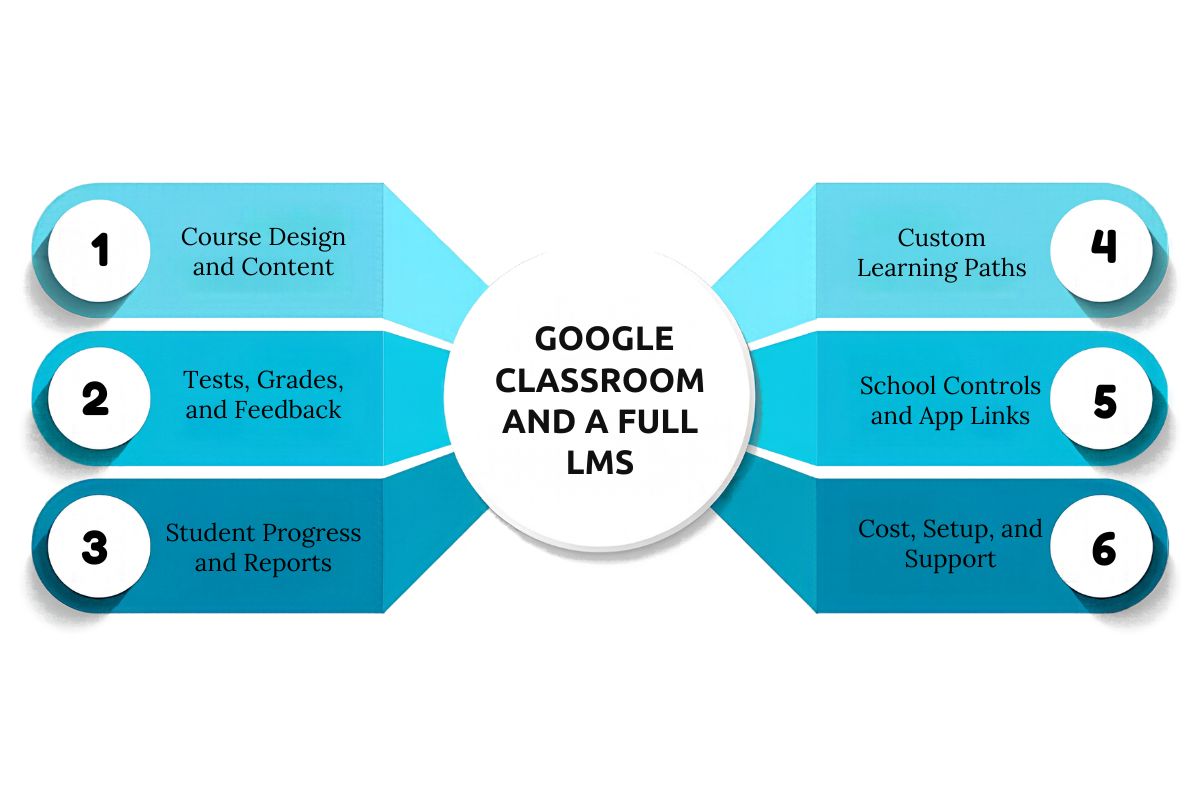
1. Course Design and Content
Google Classroom makes it easy to share files, links, videos, and tasks. Teachers can group work by topic and post class notes. This suits schools that need a simple way to share lessons online.
A full LMS may offer tools to build full courses and reuse lesson plans. Teachers can group lessons by unit, term, or skill. This helps when many teachers need to follow the same course plan. A full LMS can also have gamification elements gamification in LMS like badges and leaderboards.
2. Tests, Grades, and Feedback
Google Classroom lets teachers grade tasks and give feedback. They can also use rubrics and other tools, based on their edition. Teachers can review work and return it to students online.
A full LMS may offer more test tools, such as timed exams and question banks. It may also grade some tests on its own. These tools can help schools run tests across many classes.
3. Student Progress and Reports
Google Classroom helps teachers see who has turned in work. They can spot missing tasks and follow up with students. Some editions also offer tools to view class progress.
A full LMS may give reports across classes, grades, and courses. Leaders can review test scores, course progress, and learning goals. This gives them a wider view of how students are doing. A 2025 U.S. education survey found that 91% of public schools used diagnostic assessment data to identify individual student needs and support learning recovery.
4. Custom Learning Paths
Google Classroom lets teachers share extra tasks and useful resources. They can give more help to students who need it. Yet, it may not suit schools that need long, set learning paths.
This is an important point in the Google Classroom vs LMS discussion. A full LMS may let teachers set tasks based on each student’s needs. Some tools can change the next task based on test results. This can help teachers plan extra help or harder tasks for ready students.
5. School Controls and App Links
Google Classroom works well with Google Workspace for Education. Schools can use it with Drive, Docs, and Meet. Admin tools also help manage user accounts and access.
A full LMS offers many benefits of LMS. Schools get more control over what each user can see. For example, teachers, school leaders, and students may have different roles. It may also link with school records and other learning apps. The available tools depend on the platform.
6. Cost, Setup, and Support
Google Classroom is part of the free Education Fundamentals plan for eligible schools. Some extra tools need a paid Google Workspace plan.
Full LMS costs vary by product. Some tools are free but need paid hosting or tech support. Others charge a fee or a yearly license. Schools should also count the cost of setup, staff training, and future support.
How Should You Choose the Right LMS for Your School?
The best LMS for schools, including the Best LMS for K-12 Schools, depends on your goals, budget, and teaching needs. The short answer to the Google Classroom vs. LMS comparison is that Google Classroom is suitable for simple classwork, while a full LMS offers more control and detailed reports. Compare their strengths and limitations before making a choice.
| Factor | Google Classroom | Full-scale LMS |
| Best for | Schools needing basic online class tools | Schools needing structured courses |
| Strengths | Easy setup, task sharing, grading, and Google tool links | Advanced tests, detailed reports, learning paths, and custom roles |
| Limitations | Limited course design and reports; some features need paid plans | May need more setup, staff training, and support costs |
Choose Google Classroom if teachers mainly share lessons, collect work, and give feedback. It helps schools start online learning with little setup.
Choose a full-scale learning management system if your school needs shared courses, detailed progress reports, or learning goals across grades. Before deciding, list your must-have features, check total costs, and test both options with teachers.
Conclusion
Google Classroom or LMS battle comes down to your school’s needs and goals. Classroom works well for daily tasks, grades, and schools that use Google tools. A full LMS offers more ways to build courses, track progress, and manage learning across a school. Compare features, costs, and staff needs before you choose. Test your top options with teachers and students, then use their feedback to make a sound choice.
FAQs
1. Is Google Classroom a free LMS?
Yes, eligible schools can use Google Classroom through the free Education Fundamentals plan.
2. Is Google Classroom better than Moodle?
Google Classroom suits simple class tasks, while Moodle offers more ways to build custom courses.
3. Can a school use Google Classroom and an LMS together?
Yes, schools can link Google tools with supported LMS platforms to manage classwork and courses.