

Learning management system features help users create courses, deliver training, track progress, and measure learning results. The best learning management system (LMS) combines core tools with features that fit specific learning needs. These may include course creation, mobile access, reports, AI tools, and compliance tracking.
However, not every platform offers the same value. Some focus on schools and colleges, while others support employee development. Choosing the right features can save time and make learning more effective. This guide covers 20 key LMS features, explains how they work, and shares a checklist to help you assess your options.
What is a Learning Management System, and What are Its Types?
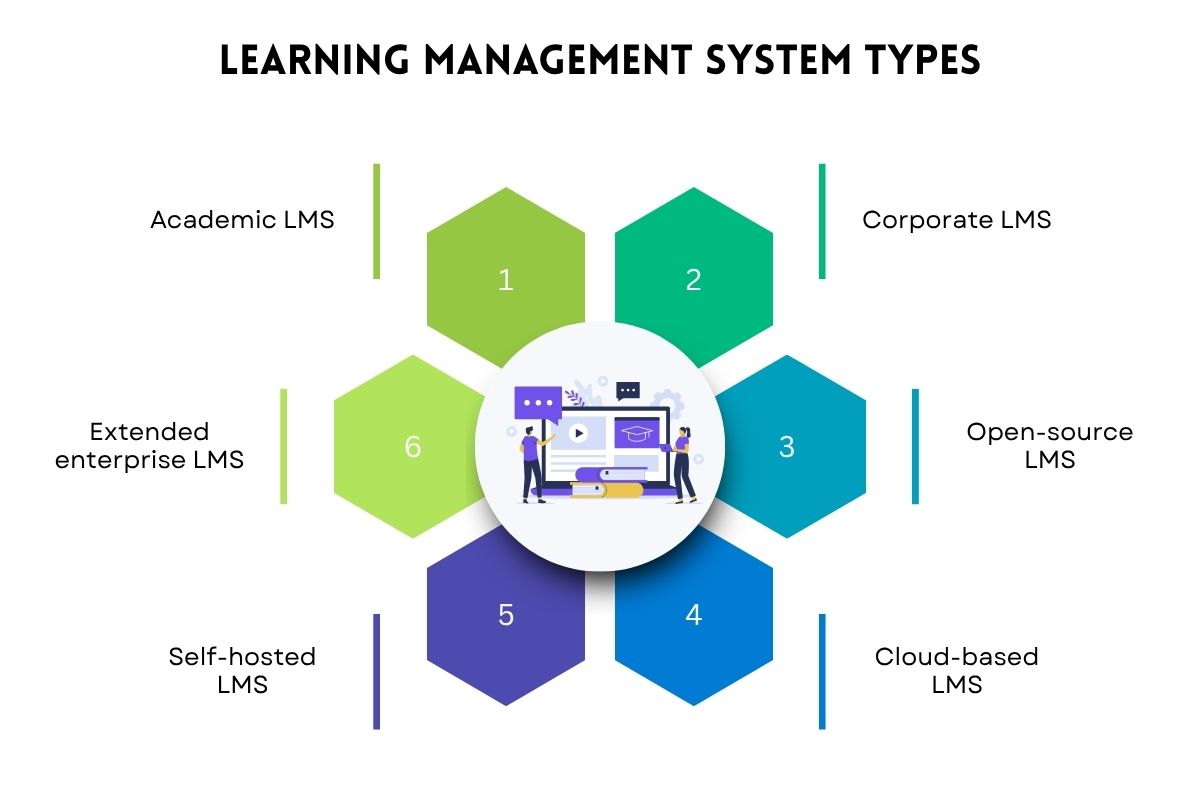
An LMS is software that helps you create, deliver, and track learning. It brings courses, learner records, tests, and reports into one place.
Most platforms fall into these types:
- Academic LMS: Supports schools and colleges with courses, grading, and class discussions.
- Corporate LMS: Delivers staff training, onboarding, and skill building.
- Open-source LMS: Offers source code access for teams wanting more control.
- Cloud-based LMS: Runs online and is managed by a provider.
- Self-hosted LMS: Runs on your own servers for added control.
- Extended enterprise LMS: Trains customers, partners, and suppliers.
The right LMS features help users create courses, track progress, and improve learning. Some tools support daily tasks, while others add AI, automation, and deeper insights. The best mix depends on learning goals, user needs, and system requirements.
Let’s explore 20 Learning management system features.
Must-have LMS Features
These eight LMS features help manage courses, users, progress, and data. They form the base of a useful LMS.
1. Course creation and content management
This feature lets users build courses, upload files, and organize lessons. An LMS can support videos, slides, documents, and interactive content. Authors can update lessons and reuse materials across courses. This keeps learning content easy to manage.
2. Quizzes and assessments
Quizzes test what learners know before, during, or after a course. Users can create multiple-choice questions, short answers, and graded tests. The LMS records scores and may grade some answers automatically. These tools help find knowledge gaps and check learning.
3. Progress tracking and reporting
Progress tracking records course completion, test scores, and learning activity. Reports turn this data into clear views for teachers, managers, and course owners. They can spot learners who need help and check if training goals are being met.
4. User management and role-based access

User management helps admins add learners, assign groups, and update accounts. Role-based access controls what each user can view or change. For example, teachers can edit course content, while learners can view lessons and submit work. This keeps records secure.
5. Learning paths
Learning paths arrange courses and tasks in a set order. An LMS can assign paths based on job roles, skill levels, or learning goals. Learners may need to finish one lesson before moving on. This creates a clear route from basic to advanced skills. Gallup estimates that better learning opportunities could boost workplace productivity by 14%.
6. Mobile learning and accessibility
Mobile learning Top Mobile Learning Platforms lets users open lessons on phones and tablets. Accessibility tools may include captions, keyboard controls, and screen-reader support. A 2025 meta-analysis of 253 studies found that mobile learning had a large positive effect on student learning gains.
7. Data security and privacy
Security tools are a crucial part of learning management system features. They protect user accounts, personal data, and course records. Common features include encryption, access controls, audit logs, and multi-factor login. Teams should also review data storage, retention, and privacy rules before choosing a platform.
8. Integrations and single sign-on (SSO)
Integrations connect an LMS with email, calendars, and other work tools. Single sign-on lets users access approved systems with one login. These links reduce manual work and make access easier. Check which tools are supported and whether extra fees apply.
Advanced LMS Features
These six features add more ways to personalize learning, automate tasks, and gain useful insights.
9. AI-powered learning recommendations
AI in learning management systems suggests courses based on a learner’s role, activity, interests, or goals. The LMS uses available data to match users with useful content. This can help learners choose courses that fit their needs and support skill growth.
10. Adaptive learning

Adaptive learning changes lessons based on a learner’s results. Someone who struggles with a topic may get extra practice. Someone who understands it well may move ahead faster. A 2024 review of 69 studies found that 59% reported improved academic performance with personalized adaptive learning.
11. AI-assisted content creation
AI tools help authors draft lessons, quizzes, summaries, and learning tasks. Users enter a topic or share source material to create a first draft. Authors must review the output for facts, bias, and quality before using it.
12. Predictive analytics
Predictive analytics uses learning data to estimate future results. An LMS may flag learners who could fall behind or fail a course. Teams can then offer help sooner. These predictions depend on data quality and should support, not replace, human judgment.
13. Skill-gap analysis
Among learning management system features, skill-gap analysis is especially helpful to companies. It compares current skills with those needed for a role or goal. An LMS may use tests, learner profiles, and job needs to find gaps. It can then suggest courses to build missing skills and track progress over time.
14. Gamification
gamification in LMS adds points, badges, levels, and leaderboards to learning. Users may earn rewards for finishing lessons or meeting goals. These tools can boost interest and show progress. They work best when rewards support real learning, not just competition.
Use-Case-Specific LMS Features
These six learning management system features serve specific needs, such as compliance, external systems, or learning across regions.
15. Compliance tracking
Compliance tracking records required courses, test results, and renewal dates. Admins can assign training and check who has finished it. Alerts may flag overdue courses or upcoming renewals. This helps teams manage safety, privacy, and other required training.
16. Certifications
Certification tools issue proof that a learner has completed a course or met set goals. An LMS may issue certificates after a user passes a test. Some platforms also track expiry dates and renewals. This helps keep clear records of completed learning.
17. HRIS and CRM integration
HRIS links connect the LMS with staff records, roles, and team changes. CRM links connect learning with customer or partner data. These tools help assign relevant courses and reduce manual updates. Check that the LMS supports your current systems.
18. SCORM, xAPI, and LTI support

SCORM and xAPI support the tracking of learning activity across content and systems. LTI links learning tools with course platforms. These standards can help teams reuse content and connect tools. Check which versions the LMS supports before moving existing courses.
19. Discussion forums and social learning
Discussion forums let learners ask questions, share ideas, and reply to peers. Some platforms also support group tasks and peer reviews. These tools help learners share knowledge beyond formal lessons. Teachers and course owners can guide discussions and clear up doubts.
20. Multilingual learning support
Multilingual support lets users access the LMS or course content in different languages. Features may include translated menus, subtitles, and local course versions. This helps serve learners across regions. Check if translations are built in or must be added separately.
LMS Features at a Glance: Which Ones Fit Your Needs?
This table links learning management system features to their benefits of LMS and priority.
| Feature | Benefit | Priority |
| Course creation and content management | Easier course delivery | Must-have |
| Quizzes and assessments | Measure understanding | Must-have |
| Progress tracking and reporting | Monitor outcomes | Must-have |
| User management and role-based access | Better control | Must-have |
| Learning paths | Guided development | Must-have |
| Mobile learning and accessibility | Wider access | Must-have |
| Data security and privacy | Lower risk | Must-have |
| Integrations and SSO | Smoother access | Must-have |
| AI-powered learning recommendations | More relevant learning | Advanced |
| Adaptive learning | Personal pace | Advanced |
| AI-assisted content creation | Faster course design | Advanced |
| Predictive analytics | Earlier support | Advanced |
| Skill-gap analysis | Targeted training | Advanced |
| Gamification | More engagement | Advanced |
| Compliance tracking | Audit readiness | Use-case-specific |
| Certifications | Verify completion | Use-case-specific |
| HRIS and CRM integration | Less manual work | Use-case-specific |
| SCORM, xAPI, and LTI support | Easier reuse and sharing | Use-case-specific |
| Discussion forums and social learning | Shared knowledge | Use-case-specific |
| Multilingual learning support | Broader reach | Use-case-specific |
What Makes a Good Learning Management System?
A good LMS is easy to use, reliable, and secure. Strong learning management system features also fit your budget, team skills, and growth plans.
It should do more than deliver courses. It should help learners apply new knowledge in real situations. As industry analyst Josh Bersin explains, “We don’t want people to be ‘addicted’ to the learning platform; we want them to learn something, apply it, and then go back to work.”
Use this checklist to compare platforms.
- Ease of use: Can learners and authors finish tasks with little training?
- HRIS and CRM integration: Can it sync with your current systems?
- Accessibility: Does it support keyboards, captions, and screen readers?
- Data privacy: Does it offer access controls, audit logs, and clear policies?
- Content migration: Can you move courses, records, results, and certificates safely?
- Implementation effort: How long will setup take? Will you need paid help?
- Scalability: Can it grow with more users, courses, languages, and locations?
- Reporting: Can you track completion, scores, and skill growth?
- Total cost: Do license, setup, support, and upgrade fees fit your budget?
- Vendor support: Does the vendor offer clear documentation and timely help?
Check examples of LMS learning management system examples beforehand. Test shortlisted platforms with real tasks before you sign up.
Conclusion
The right learning management system features help you deliver better courses, track progress, and meet goals. Start with core tools for content, assessments, reporting, access, and security. Then add AI, analytics, and specialist tools as needs grow. Use the checklist to compare platforms, test key workflows, and review costs. Build a shortlist and test the features that matter most.
FAQs
1. What are the most important LMS features?
Course creation, assessments, progress tracking, user management, security, and integrations are the most important features every LMS should have.
2. Which features suit schools and colleges?
Learning management system features like course management, grading, progress reports, and social learning help schools and colleges manage students’ learning journey.
3. Which features help employee training?
Learning paths, compliance tracking, HRIS integration, skill-gap analysis, and adaptive learning are most helpful for employee training.
4. Are AI features necessary?
AI can improve personalization, content creation, and speed. But AI features are advanced, and every program may not need them.
5. How do I choose the right learning management system features?
You can start by comparing your goals, users, integrations, security needs, accessibility, and budget. Prioritize must-have features and then look for advanced or use-case-specific features.