
What if your company could manage employee training, track skills, and spot learning gaps from one place? That is the role of learning management systems (LMS).
As companies invest more in digital learning, an LMS can help turn training from a set of courses into a structured development program. But choosing the right platform can be difficult, with many options offering different features, pricing, and tools.
This guide explains what an LMS is, how it works, and the main types and features. It also covers platform comparisons, AI, and future trends.
Learning Management Systems Explained: Meaning, Features, and Types
Employee training is no longer limited to a class or a fixed work hour. People now learn through videos, short courses, quizzes, and live sessions. They may also learn at their own pace from any device. This creates more content and data for teams to manage.
LMS gives businesses one place to run these learning tasks. It manages the full learning cycle, from course setup to learner reports. It can store and organize training content, such as videos, files, slides, and quizzes. In addition, it can set who must take each course and when they must finish it.
An LMS also manages learner records and course progress. It can track logins, course views, test scores, and completion rates. Some systems also track skills, badges, and certificates. Managers can use these records to see where teams need more support.
Many LMS platforms also handle daily tasks through set rules. For example, the system can enroll new hires in onboarding courses. It can send due-date alerts and mark required training as complete. Some tools also link with HR systems, calendars, and work apps.
Learning management systems can also help teams plan learning paths by role or skill. A sales team may follow a path for product skills, sales skills, and customer service. This gives learning a clear structure and makes progress easier to track.
A good LMS does more than hold training content. It helps turn learning activity into useful data for better employee development. An LMS can include many tools, but the key LMS features often focus on learning, tracking, and reporting.
Key LMS Features
Learning management systems do more than host online courses. It manages the people, content, tasks, records, and data tied to workplace learning. The most useful features include:
1. Course management:
Lets admins create, upload, edit, group, and organize courses in one place. Teams can build learning paths for roles, departments, or specific skills.
2. User management:
Helps admins add employees, set user roles, create groups, and control access. For example, new hires can be placed in an onboarding group on joining.
4. Assessments:
Supports quizzes, tests, surveys, and assignments. These tools help check whether employees understand the material, not just whether they opened a course.
5. Reporting and analytics:
Turns learning data into reports for managers and HR teams. Reports can show completion rates, test scores, training hours, overdue courses, and other key measures.
6. Certifications:
Tracks certificates earned through training and records expiry dates. This is useful when employees must complete safety, compliance, or job-specific training on a set schedule.
7. Automation:
Handles routine tasks without manual work. It can enroll users, assign courses, send reminders, flag overdue training, and issue certificates.
8. Mobile access:
Allows employees to learn through phones and tablets. This helps workers complete short lessons when they are away from their desks.
9. Content support:
Supports different types of learning material, such as videos, PDFs, slides, audio, quizzes, and interactive lessons. This lets teams use different formats for different learning needs.
10. Integrations:
Connects the LMS with HR systems, payroll tools, calendars, communication apps, and other business software. These links can reduce duplicate data entry and keep employee records in sync.
11. Notifications:
Sends alerts about new courses, due dates, upcoming sessions, and expired certificates. Managers can also receive alerts when required training is overdue.
12. Feedback and surveys:
Collect learner feedback after courses or training sessions. Teams can use this input to find weak content and improve future training.
What are the Main Types of LMS?
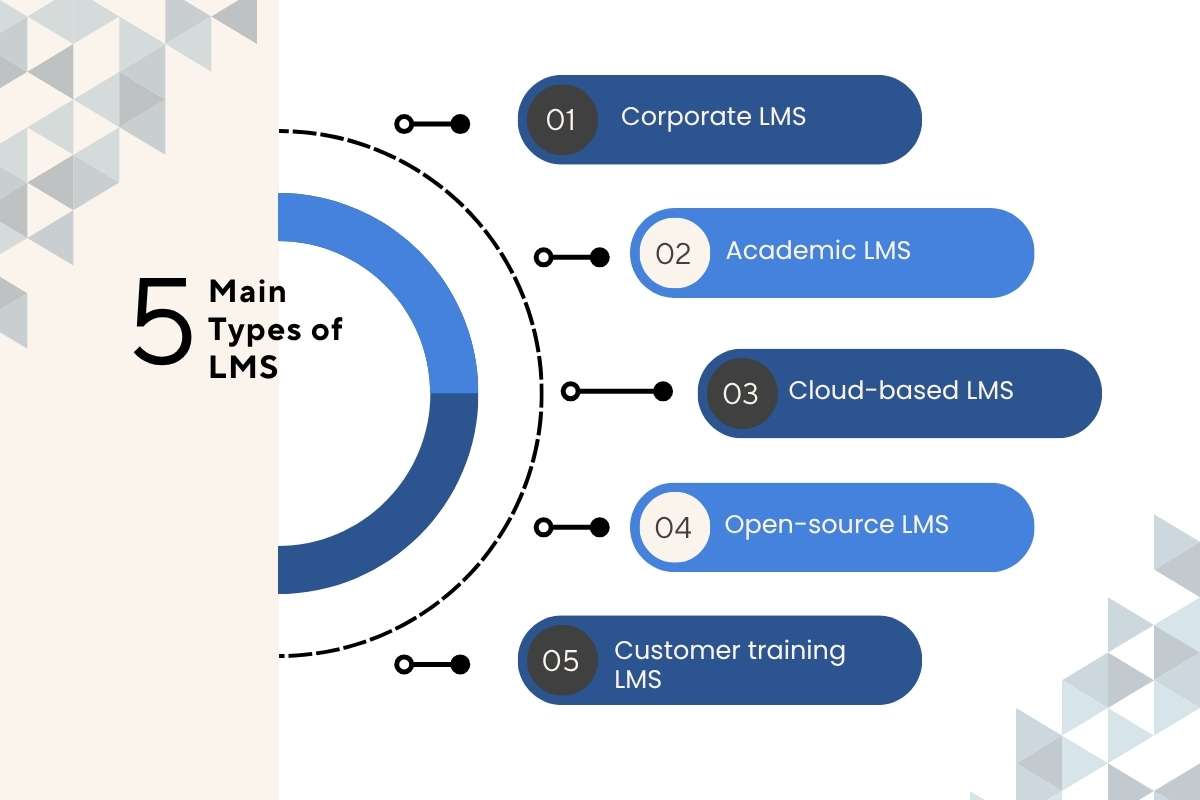
The best type depends on who will use the system and what the learning goals are. Learning management systems can serve employees, students, customers, or other groups.
Corporate LMS:
Built for employee training, onboarding, compliance, and skill growth. It can assign courses by role and help managers track team progress.
Academic LMS:
Used by schools, colleges, and universities to manage classes and student work. Teachers can share course files, set tasks, run tests, and track grades.
Cloud-based LMS:
Runs online, so users can access it through a web browser. The provider handles most updates, storage, security, and system upkeep.
Open-source LMS:
Gives organizations access to the system’s source code for greater control. Teams can change the software, but they may need in-house skills for setup and support.
Customer training LMS:
Helps companies train customers, partners, dealers, and other outside users. It can host product guides, how-to courses, tests, and certificates in one place.
These LMS differ in their users, setup, control, and support needs. The right option should match your audience, training goals, budget, and technical resources.
How Do Learning Management Systems Work?
Most LMS platforms follow a simple process. This is how they work:
Create → Assign → Learn → Assess → Track → Improve
Each step helps move training from course setup to better learning results.
1. Create
The process starts when an admin adds learning content to the LMS. This may include videos, guides, slides, quizzes, or short lessons. Admins can also group content into courses and build learning paths for different roles.
2. Assign
Next, the LMS sends the right training to the right people. Admins can assign courses to one employee, a team, or a whole department. Rules can also assign training based on job role, location, or start date.
3. Learn
Employees then log in and complete their assigned training. They may learn through videos, reading tasks, live classes, or self-paced lessons. Learning management systems let employees access training from a computer or mobile device.
4. Assess
The LMS checks whether learners understand the course content. It can use quizzes, tests, assignments, or other checks after a lesson. Scores can show which topics employees understand and where they need more practice.
5. Track
The system records key learning activity as employees move through their courses. Managers can see completion status, scores, time spent, overdue work, and other data. LMS keeps these records in one place for easy review.
6. Improve
The final step is using the data to improve training. If many employees fail the same quiz, the team can review that topic. They may update the course, add practice, or provide extra support.
Which Learning Management Systems Fit Your Organization’s Needs?

There is no single LMS that works for every organization. The right choice depends on company size, budget, training goals, integrations, and the type of learners involved.
Popular platforms include Moodle, Canvas, TalentLMS, Docebo, Absorb LMS, Cornerstone, SAP SuccessFactors Learning, and LearnUpon.
A simple comparison can help narrow the options:
| LMS type | Best suited for | Key strengths to compare |
| Moodle | Schools and organizations needing flexibility | Customization |
| Canvas | Education and academic training | Course experience |
| TalentLMS | Small and mid-sized businesses | Ease of use |
| Docebo | Larger learning programs | Automation and AI tools |
| Absorb LMS | Corporate and external training | Administration and learner experience |
| Cornerstone | Large enterprises | Talent and workforce management |
| LearnUpon | Employee and customer training | Multi-audience learning |
When comparing learning management systems, do not focus only on the number of features. A long feature list does not guarantee that employees will use the platform.
Look at how easily users can find courses, complete lessons, and get support. Also compare reporting, integrations, security, and pricing.
How Can You Choose and Implement the Right LMS?
Choosing an LMS starts with a clear list of business needs. “Involve all major lines of business (LOB) and departments in selecting a learning management system (LMS) to ensure that it meets your business needs,” says Claire Schooley, senior analyst at Forrester.
Start by defining who will use the platform. This may include new hires, managers, sales teams, or customers. Each group may need different courses, tools, and access rules. Knowing your users helps you avoid paying for tools they will not use.
Next, estimate the number of learners. A small team may need a simple platform with basic tools. A large company may need stronger user controls, reports, and support. Also, check how the platform handles growth if your learner count may rise.
Think about the type of training you plan to offer. Some teams need short courses and quizzes. Others may need live classes, video lessons, tests, or skill paths. Make sure the LMS can support the content and learning methods you already use.
Integration is another key point. Check if the LMS can connect with your HR system, payroll tools, identity system, or other work apps. Good links can reduce manual work and keep user data up to date. Ask vendors which links are ready to use and which need extra setup.
Reports should also match your goals. Managers may need course completion, test scores, or skill data. HR teams may need wider reports on training, compliance, and employee growth. Check if users can build reports without help from technical staff.
Ease of use matters for both learners and admins. A platform can have many tools but still be hard to use. Test the main tasks before you buy. Ask staff to find a course, finish a lesson, take a test, and view their progress.
Cost should cover more than the license fee. Review setup costs, support fees, training costs, storage limits, and paid add-ons. Ask how the price may change as your number of learners grows. This gives you a clearer view of the total cost.
Before making a choice, compare vendors using the same list of needs. Score each platform against key areas such as ease of use, features, support, security, cost, and integration. This makes the choice clearer and helps teams avoid decisions based only on demos.
A Practical LMS Implementation Plan
1. Set Clear Goals: Decide what the LMS must improve, such as onboarding time, course completion, or skill development.
2. Audit Current Content: Remove outdated courses and identify gaps before moving content into the new system.
3. Configure the Platform: Set up users, departments, permissions, learning paths, and integrations.
4. Run a Pilot: Test the LMS with a small group before a full launch.
5. Train Managers and Admins: Make sure the people running the system know how to use its key tools.
6. Launch and Monitor: Track usage, completion rates, support requests, and learner feedback.
7. Improve Over Time: Use data to fix weak courses and make learning easier to access.
A phased rollout can reduce problems and give employees time to adjust. In addition, organizations should also prepare for common LMS implementation challenges (T2 Cluster) beforehand.
How Can an LMS Support Employee Development?

Employee development is one of the strongest uses of learning management systems. An LMS for employee development makes learning an ongoing process. 95% of HR managers said better training and skill development improve employee retention.
For example, an employee may start with basic communication training. After completing it, the LMS can suggest courses on presentation skills, team leadership, or project management. This creates a clear path from basic skills to more advanced ones.
Managers can also create learning paths based on job roles and career goals. A new manager might receive courses on feedback, delegation, performance reviews, and conflict management. A sales worker could follow a path that covers product knowledge, sales skills, customer service, and negotiation.
LMS can also help find skill gaps. Managers can compare current skills with those needed for a role. They can then assign courses, practice tasks, or other learning based on those gaps.
Useful development measures include:
- Course completion rate
- Skill improvement
- Learning hours per employee
- Internal mobility
- Development-linked promotions
- Assessment scores
- Time to skill growth
Learning management systems can also link training data with employee development plans. This helps teams see whether learning supports new skills, career growth, and workforce needs. Managers can use this data during one-on-one talks and career reviews.
However, course completion alone is not enough. An employee can finish a course without changing how they work. Strong programs also measure knowledge, skills, behavior, and business results. This gives leaders a fuller view of whether training is creating real value.
How is AI Changing LMS Platforms?
AI is becoming a major part of modern LMS platforms. It can help reduce manual work and make learning more personal. In a survey of 421 L&D professionals, 72% expected AI to have a major impact on personalized learning.
Common uses of AI in LMS platforms include:
- Personalized Recommendations: Suggests courses based on a learner’s role, interests, or past activity.
- Content Creation: Helps create course outlines, questions, summaries, and learning materials.
- AI Tutors: Gives learners quick answers and support during training.
- Skill Analysis: Helps identify gaps between current skills and job requirements.
- Automated Administration: Helps assign training and manage routine learning tasks.
- Content Search: Lets employees find useful information using natural language.
For example, an employee could ask an AI learning assistant how to prepare for a difficult customer conversation. The system could provide guidance and point the employee to a relevant course.
AI can speed up learning, but organizations should still check accuracy, privacy, security, and bias. Human review remains important, especially for compliance and job-critical training.
Which LMS Trends Will Shape the Future of Learning?

The future of learning management systems is moving beyond basic course management. Companies increasingly want learning tools that support skills, performance, and career growth.
The pace of change is also reshaping workplace learning. LinkedIn expects 70% of the skills used in most jobs to change by 2030, making continuous, personalized, and skills-based learning increasingly important.
1. Skills-Based Learning
Companies are paying more attention to skills than fixed job titles. LMS tools can link courses to skills needed for each role. Managers can then spot skill gaps and assign the right learning. This also helps workers build skills for new roles.
2. Personalized Learning
Employees do not all need the same type of training. Learning management systems can use learner data to suggest useful courses. AI can also adjust learning based on past results and goals. This can help employees spend less time on topics they already know.
Also Read: Unlocking Potential: A Deep Dive into Personalized Learning
3. Learning in the Flow of Work
Workers often need help while they are doing a task. They may not want to leave their work tools to find an answer. LMS platforms are becoming more connected to chat, work, and team tools. This lets employees access guides, lessons, and answers when they need them.
4. Microlearning
Short lessons can fit better into busy workdays. Companies can use brief videos, quick quizzes, and short practice tasks. These small lessons can also help workers review key facts after longer training. LMS can group these lessons into short learning paths.
Also Read: Navigating the Educational Landscape with the Top 15 Microlearning Platforms in 2024
5. Stronger Skills Analytics
Future LMS tools will focus more on skills data and progress. They can show which skills employees have and where gaps remain. Managers can use this data when planning training and career paths. This can also help teams link learning with workforce needs.
6. Greater Use of AI
AI will play a larger role in content, search, and learner support. It can help create quiz questions, suggest courses, and answer basic learner questions. AI may also help spot learning gaps from course data. Still, companies need human checks for accuracy, privacy, and quality.
Overall, learning management systems are moving beyond course tracking. Future tools will focus more on skills, personal needs, timely support, and measurable learning results.
Final Thoughts
An LMS should make learning easier to manage, not add another layer of work. The right choice depends on your learners, goals, budget, content, and current tools. A small company may need simple setup, easy course creation, and basic reports. A large organization may need deeper analytics, system links, automation, and skill tracking.
Before buying, define what success should look like. Set clear goals for course use, skill growth, completion, and learner feedback. Then compare each platform against those goals. Test key features with a small group before a full launch.
Also check support, security, ease of use, and total cost. The right learning management systems can help teams deliver better training, track progress, and support long-term employee growth.
FAQs
1. What is an LMS used for?
An LMS is used to create, deliver, manage, and track training and learning programs.
2. What are the main benefits of an LMS?
An LMS centralizes training, tracks progress, automates tasks, and provides learning reports.
3. What is the difference between an LMS and an HRIS?
An LMS manages learning and training, while an HRIS manages employee data and broader HR processes.
4. How much does an LMS cost?
LMS costs vary based on users, features, support, and the provider’s pricing model.
5. Will AI replace LMS platforms?
AI is more likely to enhance learning management systems with smarter learning, automation, and personalization.